

Aprašymas
Sometimes you want to put the base URL (that of the blog, or that of the active template) in your content editor. Times when the template customising isn’t quite flexible enough.
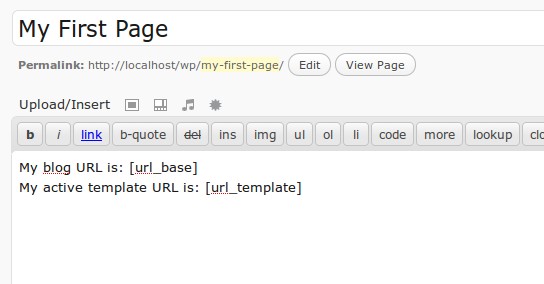
With this plugin you can use [url_base] to output the base URL of the blog (as set in your Settings). Or, you can use [url_template] to output the URL of the active template.
For example <img src="[url_base]/test.png /> in your editor might output <img src="http://localhost/wordpress/test.png" /> (if http://localhost/wordpress is what you have configured as your blog URL in Settings).
The supported short codes are as follows:
* [url_base] – the configured blog URL (set in Settings). E.g. http://localhost/wordpress
* [url_template] – the URL of the active template. E.g. http://localhost/wordpress/wp-content/themes/mytheme1
License
This plugin uses the GPLv3 license.
Ekrano nuotraukos

Diegimas
There are 2 ways of installation. If your setup supports it, you can search for the plugin, by name, within your WordPress control panel and install it from there.
Alternatively, you download the .zip file, unzip it, and copy the resultant url_short_codes folder to the wp-content/plugins/ folder of your WordPress instaltion folder.
DUK
There are no FAQs at this time. Feel free to suggest some!

Programuotojai ir komandos nariai
“URL ShortCodes” yra atviro kodo programa. Prie jos sukūrimo prisidėję žmonės surašyti toliau.
Autoriai
Išverskite “URL ShortCodes” į savo kalbą.
Domina programavimas?
Peržiūrėkite kodą, naršykite SVN repozitorijoje, arba užsiprenumeruokite kodo pakeitimų žurnalą per RSS.
Pakeitimų istorija
- Version 1.2 – Confirmed suitability with WP 4.0.
- Version 1.1 – Added graphics, and confirmed suitability with WP 3.6x.
- Version 1.0 – Initial release.