
Aprašymas
Allow users to switch which theme they use on your WordPress, WordPress MU, or BuddyPress site. Includes a widget for easily putting the theme-switcher as a list or dropdown in your sidebar.
Ekrano nuotraukos
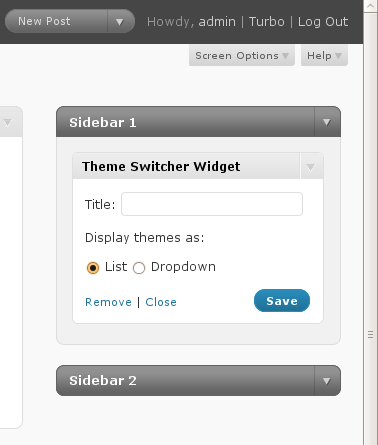
The Theme Switcher widget allows you to set the title of the widget and to choose the „list” or „dropdown” option. 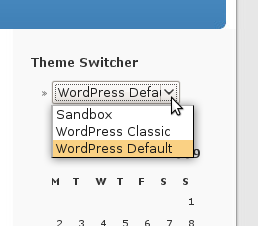
The Theme Switcher widget in action on the sidebar.
Diegimas
- Download and extract the
theme-switcherplugin file. - Upload the
theme-switcherdirectory to the/wp-content/plugins/directory. - Activate the plugin under the ‘Plugins’ menu in the WordPress admin.
- Add the „Theme Switcher” widget to one of your widgetized sidebars, or call
wp_theme_switcher()directly.
DUK
- How do I print the Theme Switcher markup without using widgets?
-
You can call
wp_theme_switcher()directly. Callingwp_theme_switcher()alone (no arguments) will print a list of themes; callingwp_theme_switcher('dropdown')will print a dropdown of themes.
Atsiliepimai
Įskiepis neturi atsiliepimų.
Programuotojai ir komandos nariai
“Theme Switcher” yra atviro kodo programa. Prie jos sukūrimo prisidėję žmonės surašyti toliau.
Autoriai

Išverskite “Theme Switcher” į savo kalbą.
Domina programavimas?
Peržiūrėkite kodą, naršykite SVN repozitorijoje, arba užsiprenumeruokite kodo pakeitimų žurnalą per RSS.