

Aprašymas
This plugin have ability to override default worpdress behavior and disable croping image but try to resize image to fit rectangle container size and fill space with background color.
You also able to choose background color to use.
Links: Example | Author Homepage
Ekrano nuotraukos
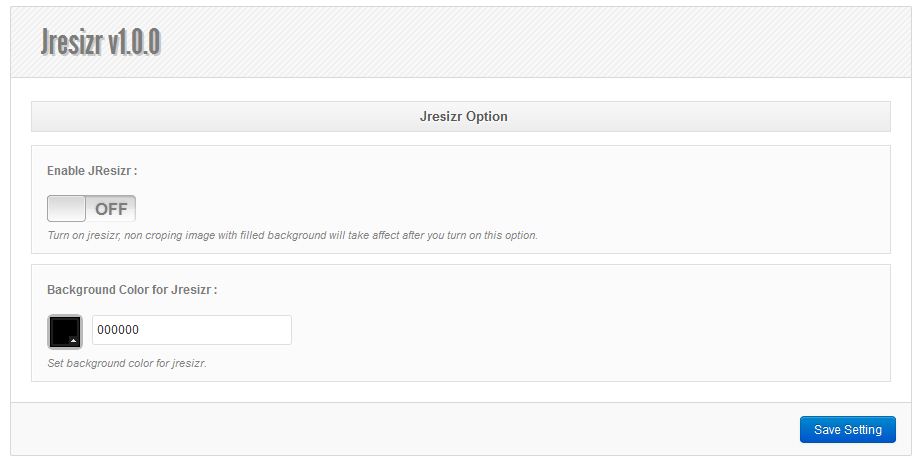
A screenshot of the plugin’s admin settings page and result. 

Diegimas
- Unzip
jresizr.zipinside the/wp-content/plugins/directory (or install via the built-in WordPress plugin installer) - Activate the plugin through the ‘Plugins’ admin menu in WordPress
- Click the plugin’s
Settingslink next to itsDeactivatelink (still on the Plugins page), - You need enable JResizr functionality from setting page, and choose background color for jresizr
Atsiliepimai

4 spalio, 2016
Its a very useful plugin. Please update a version. Its work with the latest WordPress.
THANK YOU!!!

3 rugsėjo, 2016
Simple, easy to use and best.
Although, when we resize the files with transparency it creates a black background(irrespective of what color we choose for Background).
Could you update this.

3 rugsėjo, 2016
Nice work!
Programuotojai ir komandos nariai
“JResizr” yra atviro kodo programa. Prie jos sukūrimo prisidėję žmonės surašyti toliau.
Autoriai

Išverskite “JResizr” į savo kalbą.
Domina programavimas?
Peržiūrėkite kodą, naršykite SVN repozitorijoje, arba užsiprenumeruokite kodo pakeitimų žurnalą per RSS.
Pakeitimų istorija
1.0.0
- Initialize plugin