

Aprašymas
Hide Titles is a lightweight plugin that allows you to control the visibility of titles on pages and single posts. Choose whether to show or hide titles based on your content needs.
Features
- Hide post titles
- Hide page titles
- Hide all titles
- Simple settings interface
Ekrano nuotraukos
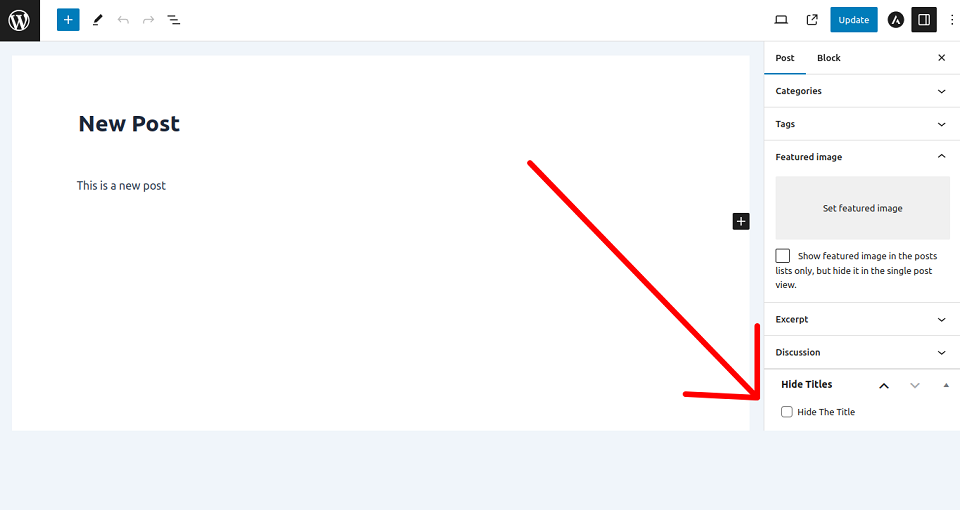
screenshot-1.png
Diegimas
Install the Hide Titles plugin via WordPress Dashboard (from plugin directory or from your computer), or upload the files manually to your server and activate the plugin.
Install via WordPress dashboard
From Plugin Directory
- Visit ‘Plugins > Add New’
- Search for ‘Hide Titles’
- Install and Activate the plugin
From Your Computer
- Download the Hide Titles plugin
- Visit ‘Plugins > Add New > Upload Plugin’
- Choose the plugin file in .zip format
- Click the Install Now button, and Activate after installation
Install via Uploading Files Manually
- Download the Hide Titles plugin and unzip the folder
- Upload the folder to your ‘/wp-content/plugins/’ directory
- Activate the Hide Titles Plugin from Dashboard
DUK
-
How to hide titles from pages and single posts?
-
Activate the plugin, go to plugin settings page and choose your option and click on ‘Save Changes’ button.
-
How to get back titles in pages and single post?
-
Go to plugin settings page, choose ‘Don’t Hide’ option and click on ‘Save Changes’ button.
Atsiliepimai


Programuotojai ir komandos nariai
“MM Title Manager — Hide Page and Post Title” yra atviro kodo programa. Prie jos sukūrimo prisidėję žmonės surašyti toliau.
Autoriai
Įskiepis “MM Title Manager — Hide Page and Post Title” išverstas į 5 kalbas. Dėkojame vertėjams už jų darbą.
Išverskite “MM Title Manager — Hide Page and Post Title” į savo kalbą.
Domina programavimas?
Peržiūrėkite kodą, naršykite SVN repozitorijoje, arba užsiprenumeruokite kodo pakeitimų žurnalą per RSS.
Pakeitimų istorija
1.9
Release Date – 8 November 2025
- Tested with WordPress v6.9
1.8
Release Date – 15 April 2025
- Tested with WordPress v6.8
1.7
Release Date – 9 April 2024
- Tested with WordPress v6.5
1.6
Release Date – 8 February 2024
- Added New Feature
- Tested with WordPress v6.4.3
1.5
Release Date – 7 November 2023
- Tested with WordPress v6.4
1.4
Release Date – 25 September 2023
- Optimized Codes
1.3
Release Date – 15 September 2023
- Added New Setting Options
1.2
Release Date – 7 September 2023
- Integrated Plugin Settings
- Tested with WordPress v6.3.1
1.1
Release Date – 9 August 2023
- Tested with WordPress v6.3
1.0
Release Date – 14 March 2023
- Initial release.