

Aprašymas
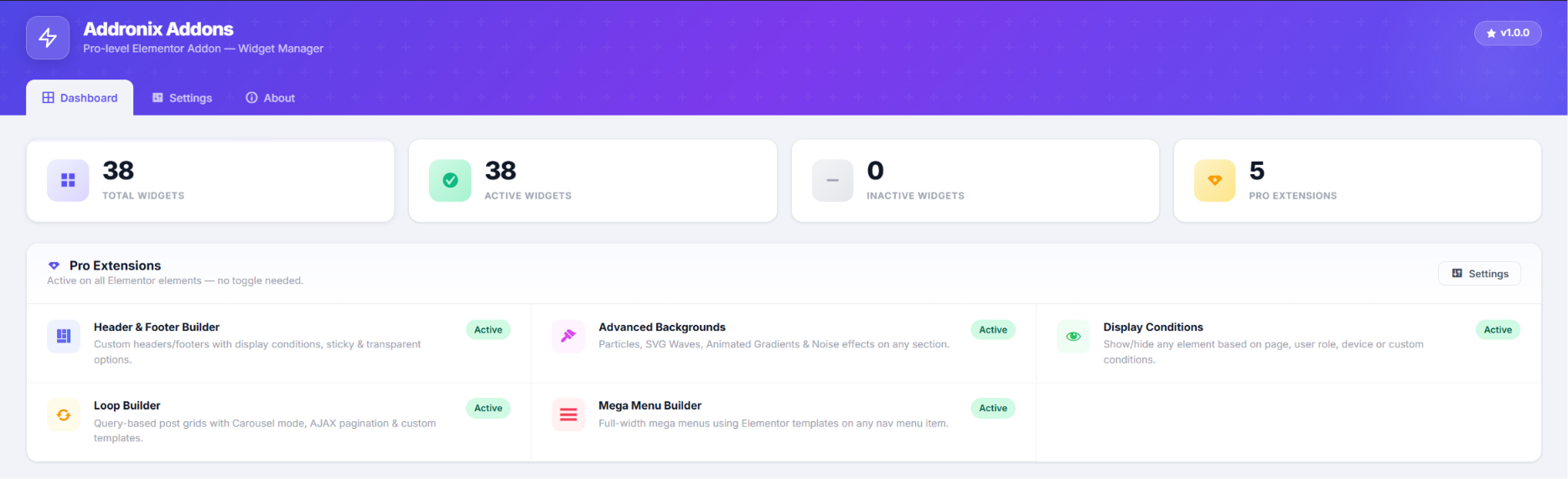
Addronix Addons for Elementor is a lightweight, high-performance addon designed to extend the capabilities of the Elementor Page Builder without slowing down your website. It provides 38 unique animated widgets with micro-animations and 5 advanced extensions including a Display Conditions engine.
🔥 5 Powerful Extensions
- Advanced Display Conditions: Easily control the visibility of ANY Elementor widget, column, or section. Create complex AND/OR logic rules based on:
- Login Status: Show or hide elements for logged-in or logged-out users.
- User Roles: Target specific roles (e.g., Administrator, Subscriber).
- Browser & OS: Show different content to Chrome users, Windows users, mobile devices, etc.
- Date & Time: Schedule content visibility based on specific dates and times.
- URL Parameters: Dynamically show elements if a specific URL parameter (e.g.,
?promo=true) is present. Perfect for marketing campaigns!
- Header & Footer Builder: Create custom headers and footers using Elementor templates with full display condition support.
- Mega Menu Builder: Build beautiful mega menus directly from the WordPress navigation menus screen.
- Advanced Backgrounds: Apply advanced background effects to any Elementor section or container.
- Loop Builder: Display any post type in custom Elementor loop templates with full query control.
⚡ Performance First
Zero bloat. Enable or disable individual widgets from the backend dashboard to keep your editor fast and clean. Assets are loaded only on pages that actually use AAFE widgets.
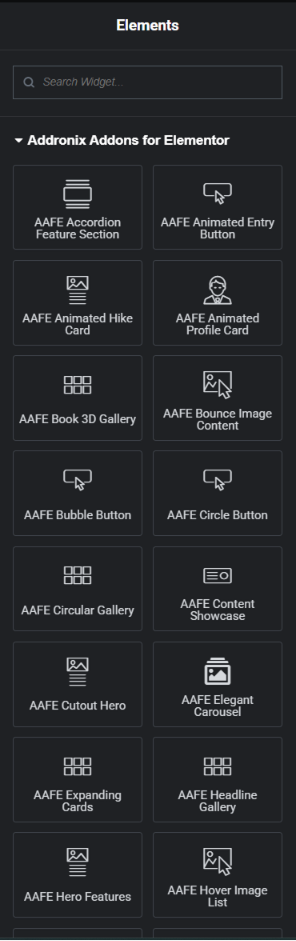
✨ 38 Widgets Included
Animated Buttons
- Animated Entry Button — Smooth entrance animation button.
- Bubble Button — Button with bubble animation effect.
- Circle Button — Circular animated button.
- Marquee Button — Scrolling marquee-style animated button.
- Slide Icon Button — Button with sliding icon reveal effect.
Hero & Banner Sections
- Cutout Hero — Hero section with cutout parallax image effect.
- Hero Features — Feature-highlight hero section layout.
- Shuffle Hero — Hero section with shuffling animated text.
- Spaced Text Banner — Full-width text banner with letter spacing animation.
Cards & Content
- Animated Hike Card — 3D stacked image card with hover spread effect.
- Animated Profile Card — Interactive profile card with clip-path reveal animation on hover.
- Bounce Image Content — Content section with bouncing image.
- Content Showcase — Hover-activated full-screen content reveal.
- Hover Reveal Card — Card with sliding image reveal on hover.
- Icon Cards — Icon + text feature cards with animations.
- Linear Card — Clean linear-style content card.
- Morphing Card Stack — Stacked cards with morphing transition effect.
Galleries & Carousels
- Book 3D Gallery — 3D book-style image gallery.
- Circular Gallery — CSS anchor-positioned circular image gallery.
- Concave Portfolio — Portfolio grid with concave hover effect.
- Elegant Carousel — Multi-item carousel with smooth transitions.
- Headline Gallery — Gallery with large headline overlay on hover.
- Image 3D Carousel — 3D rotating image carousel.
- Image Sphere — Images arranged in a rotating 3D sphere.
- Marquee Gallery CTA — Scrolling gallery with call-to-action overlay.
- Orbit Image Showcase — Images in an orbital animation layout.
Lists & Interactive
- Accordion Feature Section — Accordion with feature highlights.
- Expanding Cards — Interactive expanding content cards.
- Hover Image List — List items with large hover image reveal.
- Marquee Radio Select — Horizontal scrolling radio button selector.
- Services Showcase — Services grid with animated reveal on hover.
- Story Scroll — Cinematic scroll-based storytelling with sticky sections.
Navigation
- Nav Menu — Custom styled navigation menu widget.
Pricing & Products
- Pricing Section — Feature-rich pricing table with annual/monthly toggle.
- Product Features — Product feature highlight section.
Teams & Testimonials
- Stagger Testimonials — Animated staggered testimonials layout.
- Team Showcase — Team member cards with social links.
- Testimonials Columns — Multi-column testimonial grid.
Why Choose Addronix Addons for Elementor?
Our goal is to provide premium-quality widgets and features absolutely free. The codebase is optimized, follows WordPress security standards, and integrates seamlessly into the native Elementor UI.
Third-Party Libraries
This plugin includes the following third-party libraries, all of which are GPL-compatible:
- Swiper (MIT License) — Used for carousel widgets. https://swiperjs.com/
- Intersection Observer Polyfill (W3C Software License) — For cross-browser scroll detection.
All JavaScript animations use native browser APIs (CSS transitions, Intersection Observer, requestAnimationFrame) — no proprietary animation libraries.
Ekrano nuotraukos
Diegimas
- Upload the
addronix-addons-for-elementordirectory to the/wp-content/plugins/directory. - Activate the plugin through the ‘Plugins’ menu in WordPress.
- Make sure Elementor (free) is installed and active.
- Go to Addronix Addons in your WordPress dashboard to configure settings and disable unused widgets.
- Open any page with Elementor to start using the new widgets and the Display Conditions tab (under the ‘Advanced’ tab of any element).
DUK
-
Does this require Elementor Pro?
-
No! Addronix Addons for Elementor works perfectly with the free version of Elementor. In fact, it adds features (like Display Conditions and Header/Footer Builder) that are normally only found in Elementor Pro.
-
Will this slow down my website?
-
Not at all. The plugin is built with performance in mind. You can disable any widget you are not using from the backend dashboard, ensuring zero unnecessary scripts or styles are loaded on the frontend.
-
How do I use the Display Conditions?
-
In the Elementor Editor, click on any Widget, Column, or Section. Go to the Advanced tab, and scroll down to Addronix Display Conditions. From there, you can add multiple condition groups using AND/OR logic.
-
How many widgets does this plugin include?
-
Addronix Addons for Elementor includes 38 widgets and 5 extensions — all completely free with no upsells.
-
Are any external services used?
-
No. This plugin does not connect to any external services or third-party APIs. All JavaScript and CSS assets are bundled and loaded locally from within the plugin. No user data is transmitted to any third-party server. The plugin does make standard WordPress AJAX calls to the local site’s own admin-ajax.php for its admin settings panel only.
Atsiliepimai

Programuotojai ir komandos nariai
“Addronix Addons for Elementor” yra atviro kodo programa. Prie jos sukūrimo prisidėję žmonės surašyti toliau.
Autoriai
Išverskite “Addronix Addons for Elementor” į savo kalbą.
Domina programavimas?
Peržiūrėkite kodą, naršykite SVN repozitorijoje, arba užsiprenumeruokite kodo pakeitimų žurnalą per RSS.
Pakeitimų istorija
1.0.0
- Initial release of Addronix Addons for Elementor.
- 38 unique animated Elementor widgets included across 8 categories.
- 5 powerful extensions: Display Conditions, Header & Footer Builder, Mega Menu, Advanced Backgrounds, and Loop Builder.
- Advanced Display Conditions engine — show/hide any element by login status, user role, browser, date/time, and URL parameters.
- Widget Enable/Disable Manager for optimal performance.
- Header & Footer Builder with display condition support.
- Mega Menu Builder for WordPress navigation menus.
- Advanced Backgrounds extension for sections and containers.
- Loop Builder for custom post type templates.
- Performance Mode — load assets only on pages using AAFE widgets.
- All assets use WordPress wp_enqueue API (no inline scripts or styles).
- Full GPL-2.0+ license compliance.