
Aprašymas
The search fields simply filter the lists in their current box.
Use the settings page to manage the location of search fields.
Simple as the sun, using easy JS.
Especially useful when there are a lot of categories, like in case of a shop.
It needs jQuery to run !
Trims beginning and ending spaces !
Works with the classic editor of WordPress 5, the new editor has this functionality included.
Ekrano nuotraukos

Search field as a new tab. Click Go to go back to the filtered list.
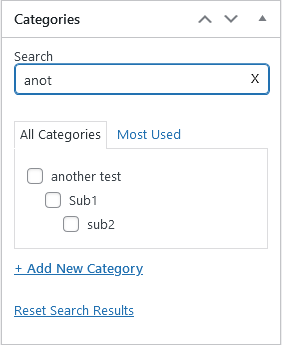
Search field below taxonomy title. Filters as you type.

Search field at author. Filters options as you type.

Settings page.
Diegimas
To install the plugin, simply install it from the directory, or use the following steps
- Upload the folder to the
/wp-content/plugins/directory - Aktyvuokite įskiepį per WordPress meniu „Įskiepiai”
- Įvykdyta
Atsiliepimai


Programuotojai ir komandos nariai
“WP Admin Category Search” yra atviro kodo programa. Prie jos sukūrimo prisidėję žmonės surašyti toliau.
Autoriai
Išverskite “WP Admin Category Search” į savo kalbą.
Domina programavimas?
Peržiūrėkite kodą, naršykite SVN repozitorijoje, arba užsiprenumeruokite kodo pakeitimų žurnalą per RSS.
Pakeitimų istorija
0.2
- Made the input field look nicer
- Reset link now resets search field, too
0.3
- Made the plugin compatible with WP 4.2
0.4
- Made the plugin compatible with WP 4.4.1
- Added code that makes ENTER act like the go button on the search field
0.5
- Made the plugin compatible with WP 4.7.2
1.0
- Updated the plugin
- Added settings page so you can decide how to use this plugin
- Updated compatibility, updated code
1.1
- Added clear button to infield search
- Added option to show subcategories if found category has any
1.2
- Added translation support and EN and HU translations
1.3
- Fixed jQuery error
- Added styling changes
- Added focus on search field when opening search tab